Developer Diary
Updates
Support article

Smantry? Yes, it’s still us. Why we changed our name from Speisekammer.App to Smantry

Kira Zabe

April 30, 2026 · Reading time: 6 Minutes
Smantry? Ja, wir sind's noch. Warum wir unseren Namen von Speisekammer.App zu Smantry geändert haben

Maybe you recently searched for “Speisekammer App” and suddenly saw a different name. Maybe that confused you, or you thought the app no longer exists. Maybe you even switched to another app because you couldn’t find us again.

We’re sorry about that. And that’s exactly why we’re writing this article today.

We’re still here. We are Smantry. And we’d be happy to explain to you what happened, why we took this step, and why this really only means good news for you as a user.

What was Speisekammer.App anyway?

Speisekammer.App was the name we started with. The idea behind it was as simple as it was important: an app that helps you keep track of your pantry, reduce food waste, and shop more smartly.

Every day, food ends up in the trash just because people forgot there was still something in the fridge. Because they bought the same thing twice. Because the best-before date was overlooked. Speisekammer.App set out to change exactly that, with a digital pantry system that simply works.

And it worked. Thousands of people have used the app, organized their fridges better, and thrown away noticeably less. That makes us proud.

But at some point we realized: the name is holding us back.

Why the name Speisekammer.App has reached its limits

A good product name grows along with the product. And that was exactly where the problem lay.

"Speisekammer" is a wonderful German word. Everyone knows it, everyone understands it immediately. But it is also a very specific word. It describes a place, a single room in the house where supplies are stored.

What we’ve built has long since grown beyond this one room. We don’t just help you manage your pantry. Together with you, we think about how your household as a whole can handle food more consciously: from the shopping list to using up leftovers, all the way to the question of what you can even cook this week based on what you already have at home.

➜ Simple tricks for using the Smantry app

On top of that, the name Speisekammer.App made it hard for us to think internationally. An app that only works in German because its name stops making sense once translated is a structural problem. Smantry, on the other hand, works in any language, sounds modern, and is easy to remember.

What is behind the name Smantry?

Smantry is a combination of smart and pantry. In other words: the clever, forward-thinking version of your food cupboard.

Smart here doesn’t just mean intelligent in the technical sense. It stands for a new way of thinking about everyday life: wasting less, consuming more consciously, planning better, without making life more complicated. Quite the opposite.

➜ Smantry: Not perfect – but made with a lot of heart

Pantry is the English word for larder and has experienced a kind of comeback in recent years. More and more people are talking about pantry organization, meal prepping, and zero-waste cooking. Smantry builds on exactly this and combines the trend with a practical, everyday-friendly tool.

The name may not feel as familiar yet as “Speisekammer”. We understand that. New names take time. But we believe that Smantry is the right name for what this app is today and what it will become tomorrow.

What has changed for you as a user? Spoiler: Very little

This is the most important section of this article, so we’ll read it through slowly together.

Your account still exists. Exactly as you left it.

Your data is still there. No losses, no gaps, no restart.

Your lists, your products, your settings: everything is preserved.

The app will continue to work on your device. You don’t need to sign in again, set anything up again, or re-enter anything.

What you see is a new logo, a new name, and a freshly designed interface that’s clearer and more intuitive than before. But the heart of the app—your data and the system behind it—has stayed the same. We’ve only renovated the house, not torn it down.

➜ All the new features in the Smantry app at a glance

Why we are writing this article now

Because trust is the most important thing we have.

In the past weeks and months, we’ve noticed that many users who used to actively work with Speisekammer.App could no longer find us. They searched for the old name and were left confused. Some left because they thought the app had been discontinued.

Keep track of supplies, groceries and durable products before small price increases turn into unnecessary extra costs.

Or try it right in your browser — no install needed

That wasn’t a planned transition, that was a gap. And we’re going to close that gap now.

If we had lost you: welcome back.

If you’re just finding us for the first time: we’re glad you’re here.

And if you’ve stuck with us through all the changes: thank you. You’ve driven us forward.

Smantry and the issue of food waste, a mission that has not changed

No matter what we’re called or what we’re about, that stays the same.

In Germany, millions of tons of food end up in the trash every year. Most of this doesn’t happen in restaurants or supermarkets, but at home, in private households, at your place and ours. Yogurt that has passed its expiration date. Vegetables that were forgotten. The leftovers from Monday that didn’t make it to Wednesday.

➜ Making a lot out of a little: How to whip up simple recipes from your leftovers 🥕🥖✨

Smantry is our answer to this. No wagging finger, no logic of renunciation. Instead, a tool that makes your everyday life easier and at the same time helps ensure that less is thrown away. Good for your wallet. Good for the environment. Good for your conscience.

That was the mission of Speisekammer.App. That is the mission of Smantry. No difference.

What comes next

The name change wasn’t an endpoint; it was a fresh start. In the coming months, we will continue to develop Smantry, release new features, and further grow the community around mindful shopping and smart pantry management.

You can be part of it.

➜ Go directly to the Smantry app here

If you have questions, feedback, or just want to say that you’re glad you’ve found us again, write to us. We read everything and we really do reply.

The Smantry team

Still have questions about the name change or the app? Write to us or visit our FAQ page.

More blog posts

Notvorrat-Checkliste 2026: Die offiziellen 10-Tage-Empfehlungen – digital statt Zettelchaos

Emergency stock checklist 2026: the official 10-day recommendations – digital instead of paper chaos

The recent Berlin power outage reminded many people: emergency preparedness isn't prepper folklore but everyday common sense. Germany's civil protection office recommends households keep a ten-day stock. Sounds like a lot – it isn't, if you approach it right.

The rules of thumb for 10 days (per person)

  • Around 20 litres of drinks – mainly water, about 2 litres per day
  • Grain products, bread, potatoes, pasta, rice (about 3.5 kg)
  • Vegetables and legumes, canned is fine (about 4 kg)
  • Fruit and nuts (about 2.5 kg), dairy products (about 2.6 kg)
  • Fish, meat or eggs, or plant-based alternatives (about 1.5 kg)
  • Fats, oil, sugar, salt – plus what you actually eat: coffee, chocolate, spices

Important: the numbers are guidance, not dogma. A stock made of things you genuinely like gets maintained – one made of dusty specialty cans gets forgotten.

Rotation instead of a bunker

The smartest emergency stock is a "living stock": buy a little more of what you use anyway, always eat the oldest first, and restock. Nothing expires and nothing costs extra. Our guide which foods to stockpile shows what works best.

Digital instead of paper chaos

A checklist on the fridge is outdated from day one. In Smantry you instead define minimum stock levels for your emergency items: the app shows how many days you are covered, warns about expiring items and automatically puts missing things on the shopping list. The preparation statistics give you the full picture.

Start today, don't be perfect

You don't have to buy a 10-day stock this weekend. Add three extra items to your next shop, record them in the app, and repeat for a few weeks. Preparedness is a subscription, not a sprint.

October 29, 2026
1 min read
Speisekammer organisieren: Das 15-Minuten-System für dauerhafte Ordnung

Organizing your pantry: the 15-minute system for lasting order

The internet is full of before-and-after photos of perfectly sorted pantries. What you don't see: what they look like eight weeks later. Order that lasts isn't created on one big cleaning Saturday but by a system that works with your routine – three building blocks of 5 minutes each.

Block 1: the 5-minute inventory (once a week)

Not the whole pantry – just one zone. This week the pasta shelf, next week the cans. Expired items out, opened items to the front, quickly update the stock in the app. After a few weeks everything has been covered once, without it ever feeling like a project. The idea behind it is explained in our article on the 5S method.

Block 2: zones instead of piles

  • Everyday zone at eye level: what you use several times a week
  • Stock zone top/bottom: refills and bulk packs
  • Use-it-up zone right at the front: everything that must go within two weeks

The use-it-up zone is the game changer: it turns "there's something in the back somewhere" into a visible cooking assignment. Our leftover recipes supply the ideas.

Block 3: first in, first out – without thinking

New to the back, old to the front – sounds trivial, but fails without an overview of expiry dates. That's where digital tracking helps: Smantry sorts your items by best-before date and reminds you in time. Our guide shows how to model storage locations, shelves and compartments in the app.

Why 15 minutes are enough

Organizing systems fail at the entry barrier, not at willpower. Three small weekly habits beat any mega cleaning day – because they happen on the side, before chaos even builds up. Start with a single zone. Today.

October 22, 2026
1 min read
Einkochen für Einsteiger: So machst du deine Sommerernte haltbar
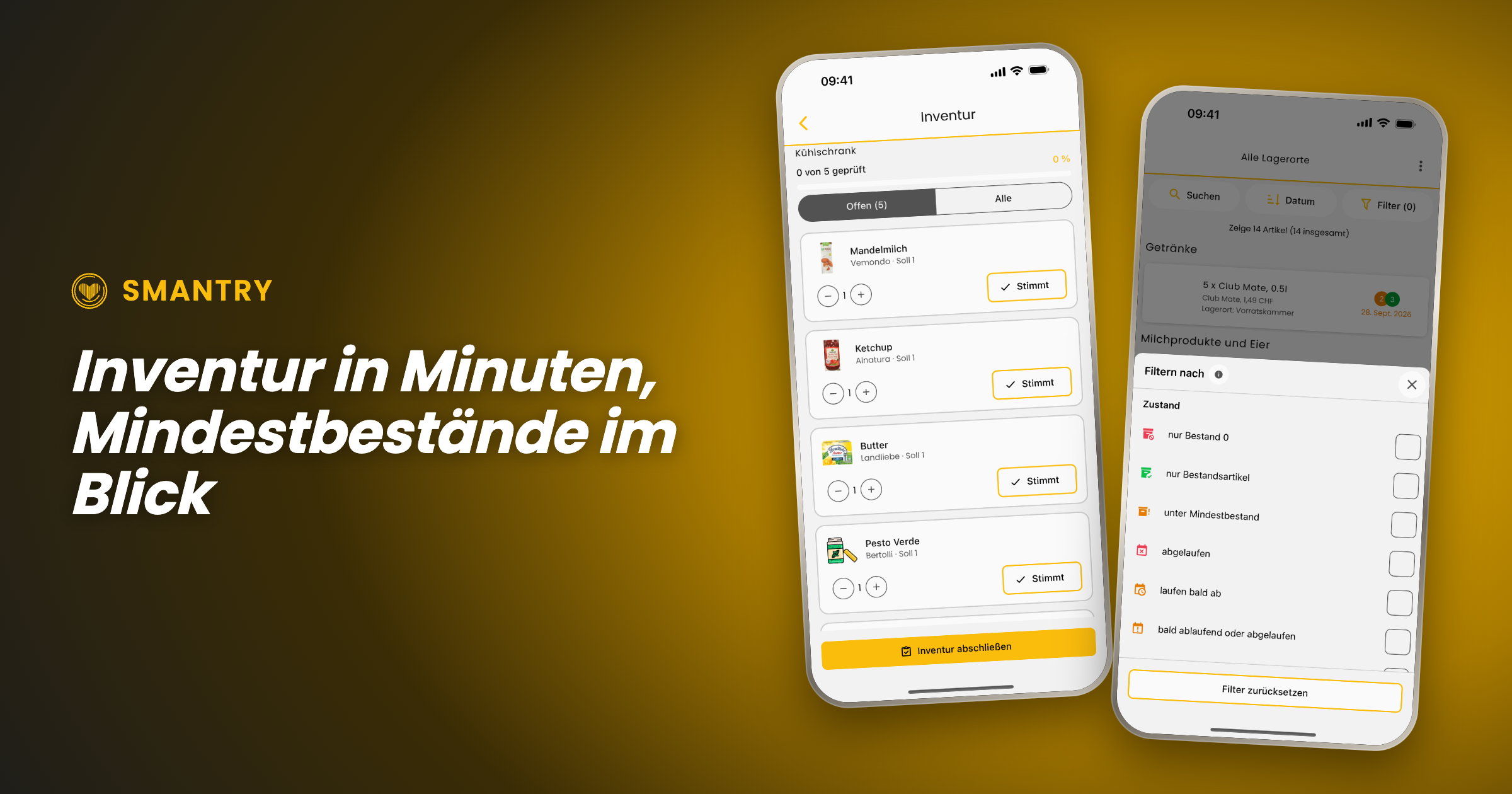
Zwei Screenshots aus Smantry 1.42: der Inventarmodus mit der Zählliste pro Lagerort und der neue Filter „unter Mindestbestand“

Smantry 1.42: Stocktaking in Minutes, Minimum Stock Levels and a New Look

Since version 1.39, two updates have been released, and together they shift the app’s focus. Until now, it was mainly about recording and keeping track of individual items. From now on, it’s about your inventory as a whole: With the new inventory mode, you can update an entire stockroom in just a few minutes, minimum stock levels tell you what’s missing rather than just what’s there, and the interface has been redesigned in the places you tap most often.

The new inventory mode: keeping each warehouse up to date

The most common reason why inventory in an app eventually becomes inaccurate is simple: over time, a gap develops between what is listed and what is actually on the shelf. Until now, your only option was to correct items one by one. Now there is a dedicated mode for that.

The inventory mode doesn't start with your entire stock, but with the question of where you are right now. You select a storage location—“pantry,” “freezer,” or “cellar”—and Smantry shows you only the items stored there. The on-screen prompt says it plainly: _“Start taking inventory right in front of the storage location.”_ That's exactly how it's meant to work—phone in hand, cupboard door open.

The counting flow itself is deliberately kept simple so that it runs quickly:

  • Each row shows Expected and Actual. If the stock count is correct, tap "Correct"—one tap, and on to the next item.
  • If it is incorrect, use − and + to correct it, then confirm by selecting "Apply".
  • At the top, the progress indicator shows: _“12 of 30 reviewed”_. Use the “Open” filter to hide everything you've already checked off.
  • Once all the rows have been checked, the screen displays "Everything checked!" and you complete the inventory count at the bottom.

Two details that make the difference between a counting aid and an honest supply:

Which unit do you mean? If a product with multiple expiration dates is stored in the storage location, Smantry does not guess. When you remove a unit, it asks: _“Which unit are you removing?”_—and indicates which one you should use first. When you add one, it instead asks for the new unit’s date, which you can either copy from the existing stock or enter manually.

Why is it being removed? When you reduce a quantity, Smantry asks why: _“Did you use it up, or did you have to throw it away?”_ This ensures that anything removed during an inventory count is included in your waste figures—instead of being hidden in a silent adjustment entry.

PortableText [components.type] is missing "image"

The summary: Taking inventory to its logical conclusion

An inventory count is only worthwhile if it ultimately leads to action. That’s why the process doesn’t end with “saved,” but with a summary: how many items you checked at this storage location, how many stock levels were adjusted, and how many items were removed—broken down into used up and discarded.

And then comes the part that saves you work: Smantry lists everything that has fallen below your minimum stock level during inventory directly underneath—with a button labeled "Add to shopping list". From the shelf to the shopping list, with no extra steps.

Minimum stock levels: finally see what's missing, too

For this to work, Smantry needs to know what counts as “enough.” You define that in the minimum stock levels—not laboriously for each individual item, but by category: two kilos of flour, six liters of milk, ten packs of pasta. The screen continuously shows you how many categories are active and what is still needed to reach the minimum levels.

New in the inventory list is the handy filter: “below minimum stock”. With a single tap, it turns the inventory list into a list of missing items—the view you actually want before going shopping. (A frequently requested suggestion from the feedback portal)

And if you're starting from scratch, you don't have to come up with the numbers yourself: Use "Load template" to import a ready-made set of minimum stock levels. The quantities are then scaled to the number of people and the desired period—you say "3 people, 10 days," and Smantry does the math.

PortableText [components.type] is missing "image"

Emergency supplies according to the BBK – with real figures

The most important of these templates is the emergency supplies table from the German Federal Office of Civil Protection and Disaster Assistance (BBK). It is now available as a template in Smantry, using the published table as its source—so it contains the quantities actually listed there, rather than estimates. The source is identified in the template dialog, and a preview shows you what will be imported before you apply it.

This is accompanied by a small but important correction to the preparedness indicator: An item can now be marked as "Do not count toward emergency supplies"—intended for anything that may be on the shelf but won't keep anyone fed in an emergency. Wine and sweets are listed as examples directly in the setting description. This simply makes the statement "Prepared for 12 days" more accurate.

A fresh look for the places you visit most

At the same time, we’ve refined the interface in the areas where most of the action happens. Not as a redesign for redesign’s sake—the list of changes may sound unremarkable, and that’s exactly the point:

  • The inventory toolbar is now evenly divided between search, sorting, and filtering. The search pill is labeled instead of showing only a magnifying glass, and the item count is back above the list.
  • The Add button on the inventory screen is now significantly larger—the app's second most common action used to have the smallest button.
  • The scanner now uses the full camera view, with the controls floating above it. The flashlight, camera switch, and manual input are all in one place instead of cropping the image.
  • Instead of spinners, while loading you'll see shimmering placeholders shaped like the content that's about to appear. It doesn't make loading any faster, but it does make the experience feel noticeably calmer.
  • Empty lists are no longer just empty lists—they now explain what to do next, tailored to the goal you selected when you started.
  • The tab bar retains the new glass look, while the page header is back to being simple and easy to read. We tried both in glass, but that was one idea too many.
PortableText [components.type] is missing "image"

Declutter: used up or thrown away, now at a glance

The cleanup list introduced in version 1.39 has gained the step it was missing. When you remove an item from it, Smantry no longer asks why in a text dialog, but instead displays two illustrated cards: used up or thrown away. You can grasp the difference in half a second instead of having to read it.

The fact that the loading spinner appears on the card you tapped may sound like a minor detail—but it makes the difference between “I know what’s happening” and “I’ll tap again.”

PortableText [components.type] is missing "image"

Expiration dates: the finishing touches

We’ve made adjustments to the new durability screen introduced in 1.39 based on the feedback we received:

  • One tip instead of two: The date input opens directly, without an intermediate step.
  • The year list now starts with the current year – instead of somewhere in the forties, requiring minutes of scrolling to reach the present.
  • On the iPad, the dialog now follows the device's orientation, including in landscape mode.
  • "Does not expire" is finally respected everywhere: no expiration indicator in the list and no best-before status for items you've marked as non-perishable.
  • In the article detail view, the workflow status is now displayed as text instead of just as a colored dot.

Sign in: one tap, one account

Sign-in now takes place on a dedicated, secure sign-in page (`identity.smantry.com`) – and best of all, it opens with a single tap and already knows whether you wanted to sign in or register. Cases that previously resulted in two accounts being created because an email address was already linked to a different sign-in method now prompt you for confirmation instead of displaying an error.

By the way: New accounts are now set up in your language. Previously, welcome content and emails could appear in English without warning, even though the app was running in German.

Further improvements

  • Full-size product images: Tapping a product image now opens it in full view again—even directly from the inventory list, and above the header instead of below it.
  • Form stays open: When you select a photo while creating a new product, the form no longer closes—your entries remain in place.
  • All storage locations in the Move dialog: When moving an item, not all destinations were always visible. Now they are.
  • Create storage location: If creation fails, the app now tells you instead of silently doing nothing. It also now rejects names consisting only of spaces.
  • Printing on Android: The stock list printed as a PDF can be reopened.
  • Product database: If a product cannot be synchronized with the product database when saving, you will now be notified—instead of it being silently lost.
  • Accessibility: Filter rows are announced correctly as checkboxes, the removal-reason buttons have meaningful labels, and small buttons meet the 44-point minimum size again.
  • Fewer false alarms: Brief network dropouts are no longer reported as errors, and stalled database connections recover by themselves instead of ending in an empty list.

And for companies: Smantry Enterprise

A large part of the work in these two versions is invisible in a private household, because it is meant for businesses: households can now belong to a company, with roles, seat-based billing and a log of every stock change. In the app you only see what concerns you — the note “This account is managed by your company”, for instance — and the option to issue material to people and take it back, right on the phone.

If you use Smantry professionally, write to us and we will show you.

Update now

Smantry 1.42 is available on the App Store and on Google Play. One tap on “Update” is all it takes — then give the new inventory mode ten minutes. One storage location is enough to see the point.

Do you have feedback on the new features, or an idea for the next version? Tell us directly in the app via the support chat or in the feedback portal. The “below minimum stock” filter, the one-tap calendar and the month-only mode all started there.


September 27, 2026
9 min read